
Paint 3D
Developer: Microsoft
2.9 (144)-
 Windows

Choose a platform
-
Windows Version 2024.2402.12017.0
65 MB
DownloadRecommended for your device
Overview
Introduction
Paint 3D is a dynamic and versatile graphics program developed by Microsoft Corporation. It is an evolution of the classic Microsoft Paint and represents a new dimension, allowing users to create and process both 2D and 3D images. In this in-depth guide, we will review the main features of Paint 3D, delve into the history of its developers and answer frequently asked questions to help users unleash their creativity with this innovative tool.
The creative minds behind Paint 3D
Microsoft Corporation, a global technology leader, is the developer of Paint 3D. Known for its commitment to providing users with intuitive and accessible tools, Microsoft has reimagined the traditional drawing application to make digital creativity more inclusive and engaging.
Key features of Paint 3D
- Intuitive Interface:Paint 3D has a user-friendly interface, making it accessible to both beginners and experienced digital artists.
- Creating 2D and 3D: Users can express their creativity in both 2D and 3D spaces, opening up a world of possibilities for digital art.
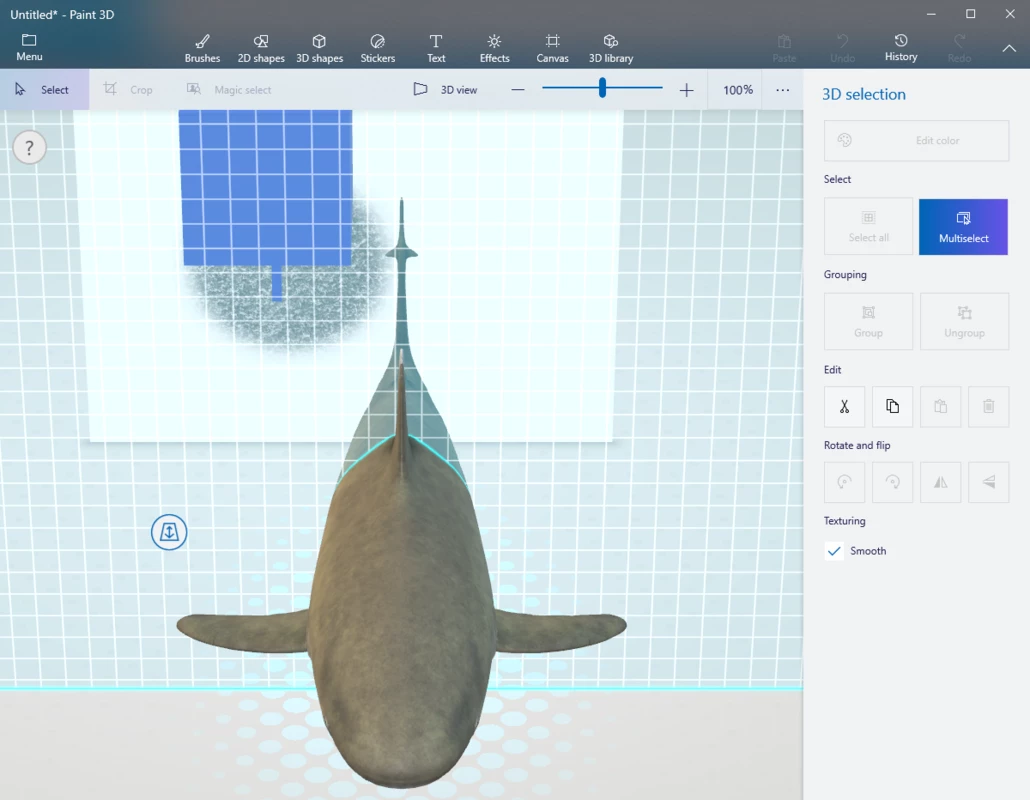
- Manipulating 3D Objects: Paint 3D allows users to easily create and manipulate 3D objects, adding a unique dimension to digital art projects.
- Magic Select: The Magic Select tool lets you effortlessly remove backgrounds from images, making it easier to incorporate objects into different scenes.
- 3D Doodle: With the 3D Doodle feature, users can draw in three dimensions, giving a new level of depth and creativity to their work.
- The Remix 3D Community: Paint 3D connects users to the Remix 3D community where they can share their work, find inspiration and collaborate with other artists.
- Stickers and Textures: The program offers a range of stickers and textures that users can apply to their creations, giving them a personalized touch.
Conclusion
Paint 3D, developed by Microsoft, is not just a tool, it's a canvas for digital expression. Whether you are an aspiring artist, a student exploring creative avenues, or just want to have fun with digital art, Paint 3D provides an affordable and innovative platform. As Microsoft continues to improve and expand the capabilities of Paint 3D, users can expect even more exciting features and capabilities in the world of digital creativity. So unleash your imagination, immerse yourself in the world of Paint 3D, and let your creativity flourish in both two and three dimensions.
Features
Pros
- User-Friendly Interface
- 3D Drawing and Modeling
- Basic Image Editing Tools
- Support for 3D Models from Online Community
Cons
- Not Suitable for Professional Design Work
Screenshots
Ask a Question
Can I import 3D models into Paint 3D?
Absolutely. Paint 3D allows you to import 3D models created elsewhere or taken from the Remix 3D community.
What file formats does Paint 3D support?
It supports various image formats including JPEG, PNG, BMP and GIF, making it versatile for various creative projects.
Can I use Paint 3D for professional graphic design?
Although Paint 3D is a powerful tool, it is more suitable for everyday and creative projects. Professional graphic designers may prefer more specialized software.
Can I collaborate with other people on Paint 3D projects?
Designed primarily for individual creativity, so collaboration options are limited. However, users can share their work so that others can remake it.
Similar programs
-
 Power BI Desktop Microsoft
5 (1) Free 59 447
Windows
View Power BI Desktop -
 MSI Live Update Micro-Star INT'L CO., LTD.
5 (2) Free 1 425
Windows
View MSI Live Update -
 ESET Online Scanner ESET, s r.o
5 (1) Free 3 082
Windows
View ESET Online Scanner


